



PrestaShop v1.5 - v8.2.1
Win customers with the Google Reviews module on PrestaShop, which allows you to display your rating and reviews from Google on your website.
With this module, you can easily display your regularly updated reviews on multiple pages of your e-commerce site.







Integrating a Google review module directly into your website is a powerful strategy for converting visitors into customers, for several reasons:
Thanks to our Google reviews module on PrestaShop, your home page will look more professional and lively after adding the widget.
Your latest reviews will scroll right next to your overall rating and the number of reviews.
Customers will then be able to see your latest ratings and reviews in general. If they want to see more, they can always click on the ‘All reviews’ button.
This widget can also be displayed in other locations (hooks) on your site.
Thanks to the badge that displays your overall rating with stars and your total number of reviews on Google, you can reassure visitors who land on one of your pages.
Visitors who see positive and authentic reviews are reassured, as it proves that other people have already tried and used your services.
If they are anxious, they can view all your reviews from any page via your widget.
Statistics show that a website displaying customer reviews can see its conversion rate increase by 15% to 20%.
If you do not display your reviews, users will likely leave your site to look for them themselves. Once they leave, there is a good chance that they will be distracted by a competitor or an advertisement. By displaying them, you keep them in your sales funnel.
Some comments are also very useful because they answer questions that your marketing department had not specified (actual delivery time, quality of after-sales service, etc.).
Thanks to the module that regularly displays the latest reviews, new keywords are regularly injected into your page without you having to do it yourself. Google appreciates recent and relevant content!
Google also analyses the time spent on your website. When your visitors take the time to read your reviews, this reduces your bounce rate and therefore sends a positive signal to Google's search algorithms.
Installation is very simple and only takes a few moments. Just go to your module manager to ‘install a module’.
Once the module is installed, find it and click on configure.
Start by connecting your module to your Google account and the relevant establishment. If you have several establishments linked to the same Google account, they will all appear.
Once you have entered the information, click on save.
Define which reviews you want to display on your widget and on your review page.
You can display all reviews with a rating of 1*, 2*, 3*, 4* or 5*.
N.B.: If you choose 5* and you only have 2 reviews with a 5* rating (e.g. 2 out of a total of 120 reviews). Only 2 reviews will be visible on your page and widget, but the overall rating displayed on the badge, widget and page will remain unchanged (e.g. 4.2* based on 120 reviews).
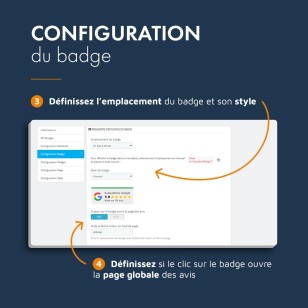
In the configuration menu for your future badge, you can choose:
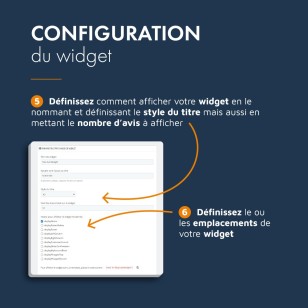
From your widget's configuration menu, you can define:
In the configuration of your dedicated reviews page, you can manage important SEO tags:
You will also be able to display a certain number of reviews on a page.
Each time you click on ‘More reviews’, it will display the same number again.
Once you have configured the three options, you can apply a display style to your badge, widget and page.
You can change three colours:
Once you have configured everything and clicked on ‘Save’, your elements are ready and your visitors will be able to view your reviews directly on your website.